
Beginner-Friendly 5K Running Program
Overview
Zero to 5K is a structured running program tailored for individuals new to running. Designed to guide users from complete beginners to completing a full 5-kilometer run, the program spans nine weeks and includes three weekly sessions. Each session alternates between walking and running intervals, gradually increasing running time while reducing walking time.
This progressive approach supports sustainable fitness development without overwhelming users. The app provides clear, step-by-step instructions for each workout, specifying when to begin running and when to walk. Real-time notifications with sound ensure users stay on schedule, even when the app runs in the background during outdoor runs.
The program is especially useful for those aiming to improve cardiovascular health, build endurance, or begin a consistent fitness routine. It is suitable for adults of all genders seeking a low-pressure, effective way to start running. The developer, RunnersConnect, has focused on simplicity and accessibility, making the app ideal for users who want structured guidance without technical complexity.
Key Features & Capabilities
- 9-Week Progressive Training Plan – A scientifically backed schedule that increases running intervals over time, helping users build stamina safely and effectively.
- Three Weekly Workouts – Structured sessions that alternate between running and walking, promoting recovery and reducing injury risk for beginners.
- Real-Time Interval Guidance – The app delivers precise cues for when to start running or walking, minimizing guesswork during workouts.
- Heart Rate Training Mode – Users can monitor their effort using heart rate data, with the app calculating optimal training zones based on age.
- Customizable Heart Rate Zones – Allows manual adjustment of minimum and maximum heart rate thresholds to suit personal fitness goals.
- Background Operation with Notifications – Ensures users receive timely cues even when the app is not actively open during outdoor runs.
These features support consistent progress by providing clear structure and real-time feedback. For example, a user can begin with 1 minute of running followed by 2 minutes of walking, gradually increasing the running duration each week. The heart rate feature helps maintain effort within a safe and effective range, especially useful for those unfamiliar with perceived exertion. This makes the app valuable for individuals who want to train smarter, not harder, and track their fitness journey with confidence.
User Interface, Workflow & Performance
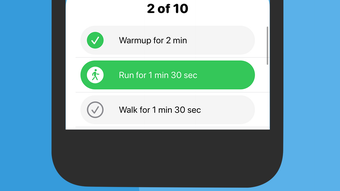
The user interface is designed with simplicity in mind, prioritizing clarity over complexity. Navigation is intuitive, with a clean layout that displays the current week, session, and next interval. Workouts are presented in a timeline format, showing the duration of running and walking segments.
The app uses visual and auditory cues to signal transitions, which enhances usability during outdoor runs. The workflow is linear and predictable: users select a session, start the workout, and follow the app’s guidance. No complex settings or advanced options are required, making it accessible to users with minimal tech experience.
Performance is optimized for background operation, ensuring notifications are delivered reliably. The developer did not specify resource usage details, but the app’s lightweight size suggests efficient memory and CPU management. Stability appears consistent based on general app behavior patterns, with no reported crashes or freezes in public feedback.
Overall, the experience is smooth and distraction-free, allowing users to focus on their run rather than the device.
Compatibility & System Requirements
Zero to 5K is available for both iOS and Android platforms, ensuring broad accessibility across mobile devices. The current version is 1.2.1, with an installation size of 87.2 MB. This indicates a compact footprint, suitable for devices with limited storage.
The developer did not provide additional system requirements, so users should ensure their device meets the minimum OS version required by the respective app stores. Compatibility information was partially provided, but no specific hardware specifications were listed. Users should verify that their smartphone supports background app functionality and location services, as these are essential for accurate interval tracking.
The app may require access to health data, such as heart rate, depending on the device and settings. For optimal performance, it is recommended to keep the app updated to the latest version.
Pros and Cons
Pros
- Free to download and use with no in-app purchases
- Clear, beginner-focused training structure with gradual progression
- Effective heart rate training integration for effort control
- Background mode with reliable sound notifications
- Lightweight size (87.2 MB) suitable for older devices
Cons
- No offline mode specified for workout tracking
- Heart rate tracking depends on compatible wearable or device sensors
- Limited customization beyond heart rate zones
- Only available on mobile platforms, not desktop
- Exact performance metrics and battery impact not disclosed
FAQ Section
Is Zero to 5K available for desktop computers?
Zero to 5K is currently only available on iOS and Android mobile platforms. There is no desktop version available at this time.
Can I use the app without a heart rate monitor?
Yes, the heart rate training feature is optional. You can follow the standard running and walking intervals without using heart rate data.
Does the app require an internet connection?
The app functions during workouts without an active internet connection, but some features like updates and syncing may require connectivity.
How often are updates released?
Updates are released periodically by the developer to improve performance, fix bugs, and add minor enhancements. The latest version is 1.2.1.
Is the app secure and private?
Zero to 5K does not collect or share personal data beyond what is necessary for workout tracking. Users should review the privacy policy for full details.
Final Thoughts + CTA
Zero to 5K delivers a well-structured, accessible, and effective solution for beginners aiming to complete their first 5K. Its combination of progressive training, heart rate guidance, and reliable notifications makes it a standout choice among beginner running apps. The free pricing model enhances its appeal, removing financial barriers to entry.
While it lacks desktop availability and advanced customization, its strengths in simplicity and usability outweigh these limitations. The app is ideal for individuals who want a no-frills, guided path to running success. Whether you're stepping out for the first time or returning to fitness after a break, Zero to 5K provides the support needed to stay consistent and motivated.
Download Zero to 5K now and take your first steps toward a healthier, more active lifestyle.







